AlbertCode SWE Agent
The coding agent that proves its work.
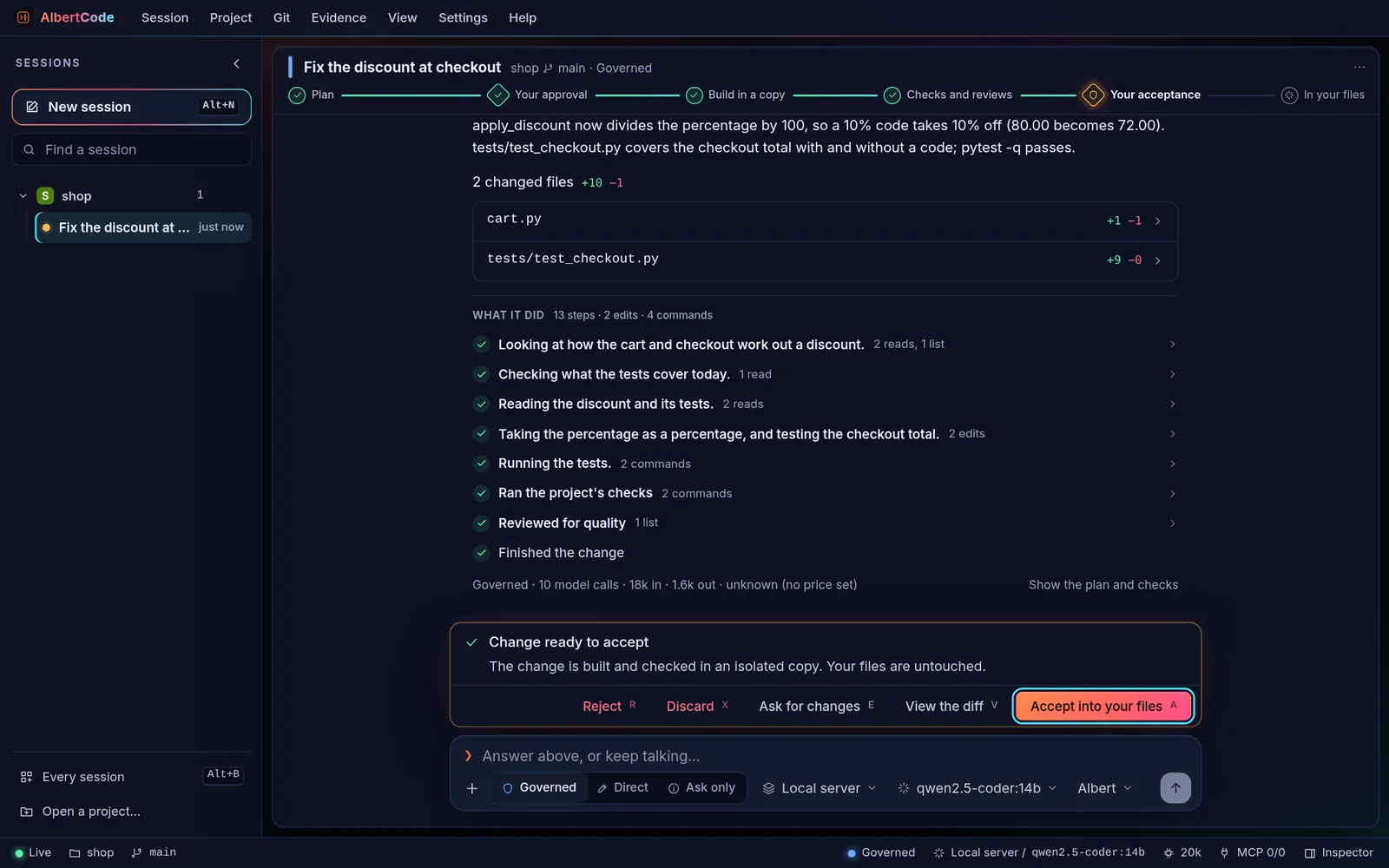
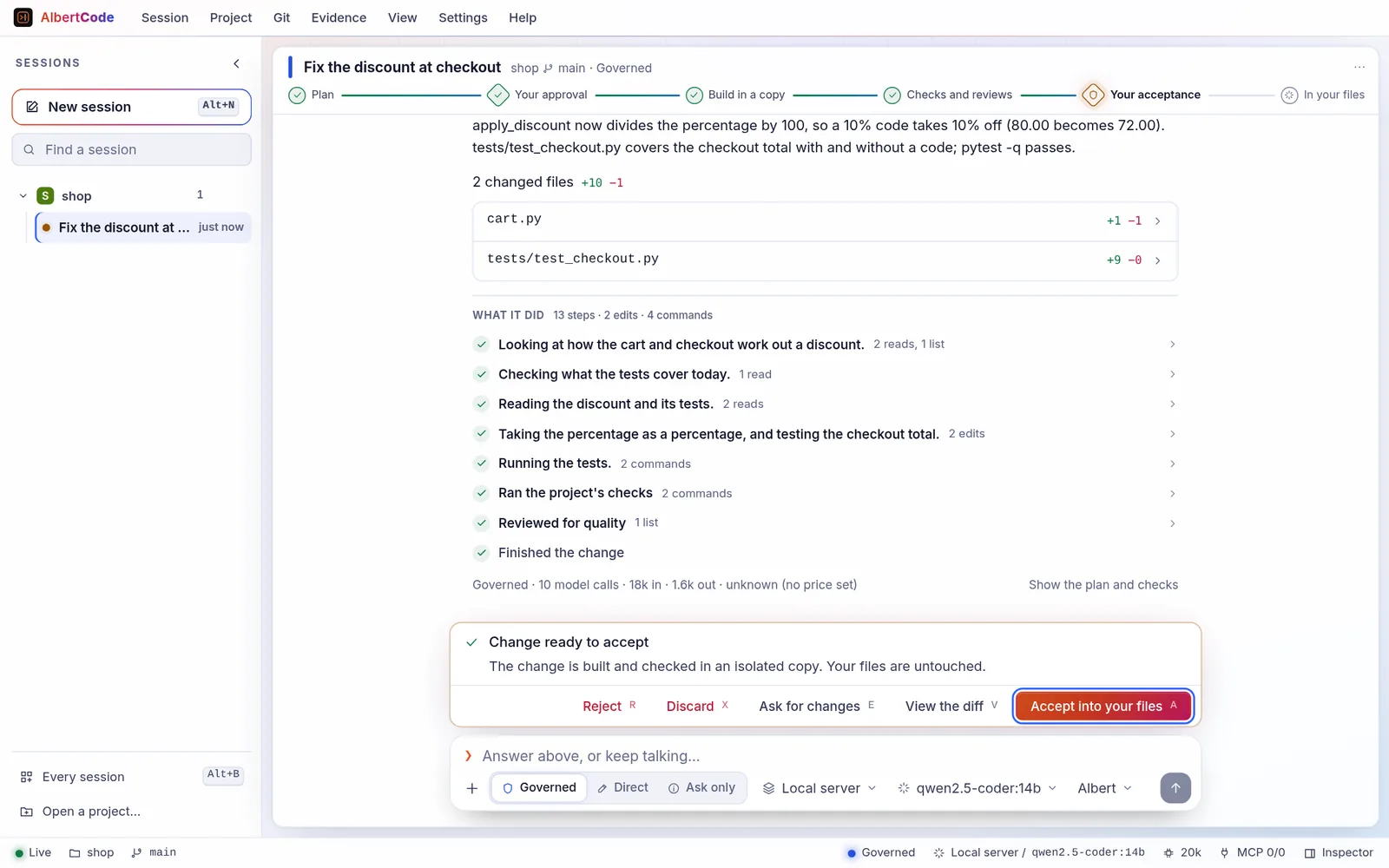
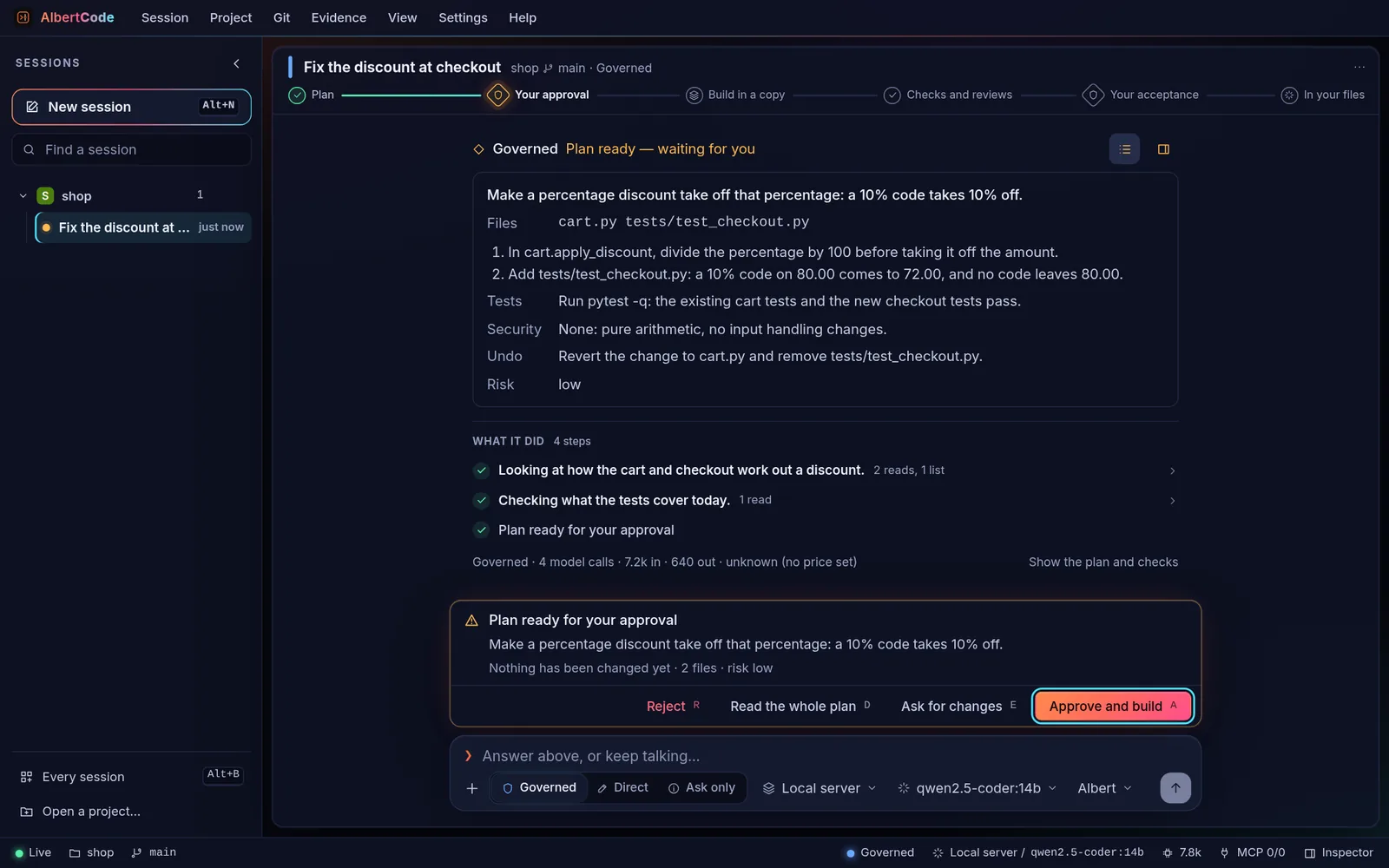
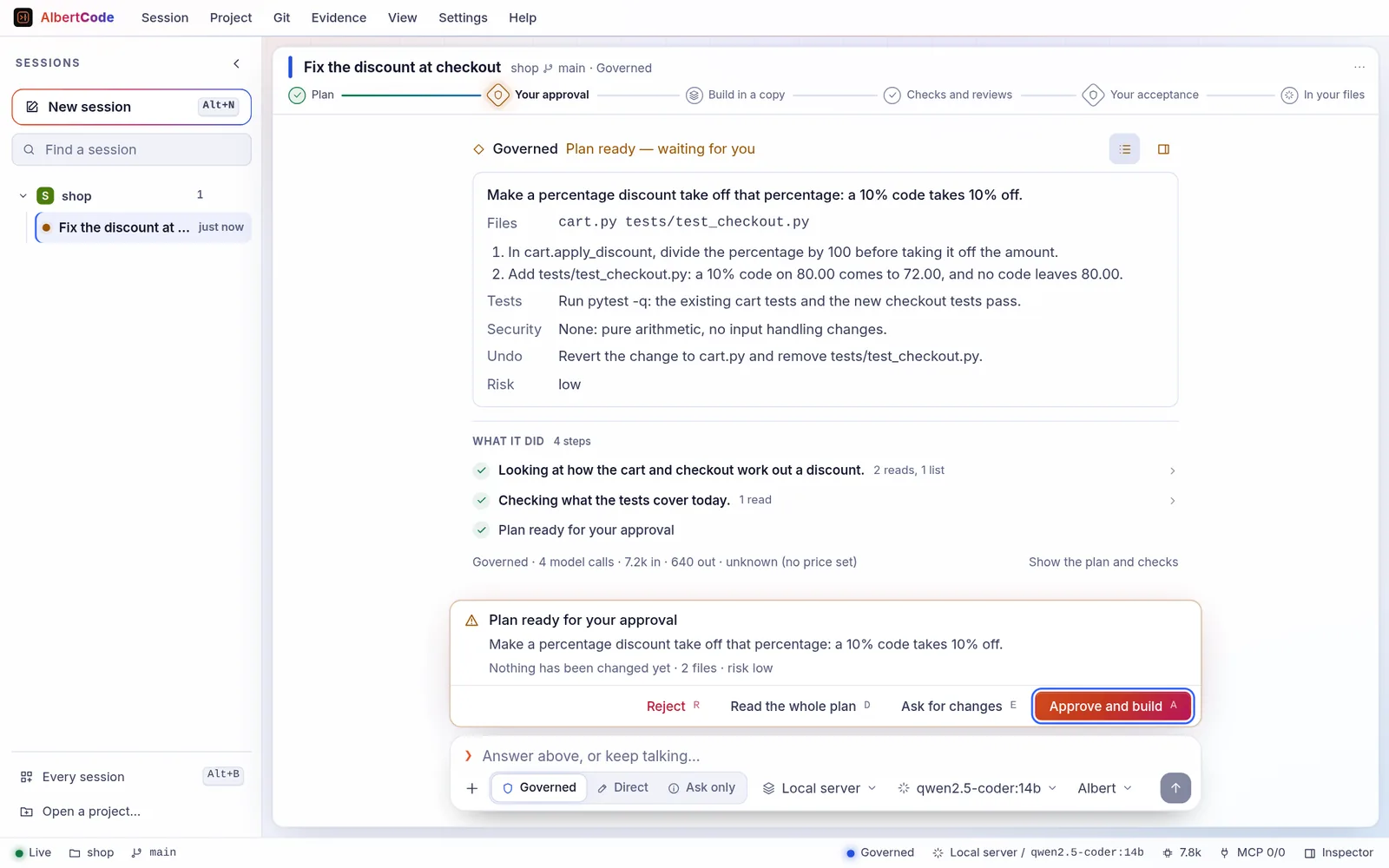
A coding agent that runs on your machine. It plans a change, builds it in an isolated copy of your repository, runs your own tests, reviews the result, and shows you the diff. Nothing reaches your files until you accept it.
Or plan a first run in the run planner.
Overview
What it does for you.
Approval built in
Two clear decision points — the plan and the diff — so nothing reaches your repository by surprise.
Proven, not just written
Runs your own toolchain (pytest, npm scripts, go test, cargo, Maven, Gradle, dotnet) and shows what passed and what didn't.
Three interfaces
Terminal, browser and VS Code, all driving the same local service and the same sessions.
Any model
A hosted provider, OpenRouter, Hugging Face, any compatible API, or a model on your own machine.
Private by default
Runs on your machine, with no account and no telemetry. Keys live in your OS keychain.
A record of every change
Each task keeps its plan, test results, reviews and diff together, in a tamper-evident ledger you can export.
In the product
The product itself, not renderings.
Captures of the AlbertCode SWE Agent 1.54 interface from its README. The model's answers were scripted for the pictures. Each is shown in your current theme.
Technical capabilities
Interfaces, modes and commands.
Interfaces
- Terminal
albertcodeWorking where you already are: sessions, the conversation with its gates, and every list on one screen. albertcode classic opens the classic terminal.
- Browser
albertcode webPlans and diffs side by side, with your files, your running app, its tests and a shell beside the conversation.
- VS Code
The AlbertCode panelStaying in your editor. Install albertcode-<version>.vsix from the latest release; it uses the installed AlbertCode.
Modes
- GoverneddefaultChanges you care about
You approve a plan; it works in an isolated copy, runs your tests and reviews the result; you approve the diff.
- DirectQuick changes you are watching
Works in your real files, asking before each write, or applying writes as they come with auto. Needs Git.
- Ask onlyUnderstanding a codebase
Answers questions and changes nothing; a change is offered for your go.
Everyday commands
/connect- Connect a model provider: its key, or the address of a local model
/model- Choose a model
/plan <request>- Start a governed change
/do <request>- Start a direct change
/attach <paths>- Give it files or screenshots
/tasks- Every task by where it stands; open one to answer its gate
/contract- The repository's boundary: what AlbertCode may do there
/help- Every command
From a script or CI
albertcode run "Why does the cart total round down?" --lane askalbertcode run "Add a test for the 10% code" --approve plan,resultalbertcode run "Rename getUser to fetchUser" --lane direct_auto --json| Exit code | Meaning |
|---|---|
| 3 | A governed change stopped at its plan because --approve did not cover it. Open the session to answer it. |
Architecture
One local service. Everything else is a view of it.
AlbertCode runs as a small service on your computer. The terminal, the browser workspace and the VS Code panel all talk to it, so a task started in one can be followed in another, and a run keeps going when you close a window. albertcode stop stops it.
A repository can carry a contract — albertcode.contract.toml — that bounds what AlbertCode may do there. It is read from your repository, never from the isolated copy, so a task cannot widen its own limits.
version = 1
name = "shop"

[scope]
forbidden_paths = ["src/payments/**", "infra/**", "**/migrations/**"]
max_files_changed = 15

[verification]
required = true
must_pass = [["npm", "test"]]

[approvals]
require_admin_for_risk = ["high"]
Committed, this refuses any plan touching src/payments, blocks acceptance of a change that fails npm test, and makes high-risk plans wait for an administrator. From docs/contract.md.
Benchmark · self-reported
SWE-bench Pro, hardest split.
HARD-51 is the part of Scale AI's SWE-bench Pro that at least two of five frontier model families failed. Each task is a real issue in a professional open-source project, judged by that project's own hidden tests.
Run and graded by the AlbertCode developer, not independently verified. More than half the tasks had been seen during development, so the 22 held-out tasks are the fairest measure. One run, one unnamed frontier model at high reasoning effort set by the harness — not AlbertCode's default — so results with default settings may differ. No comparison with other systems is made.
39/51
76.5% resolved · 95% interval 63.2–86.0%
14/22
63.6% resolved · 95% interval 43.0–80.3%
- Protocol
- One attempt per task, up to 50 minutes, no web lookup, no human help
- Mode
- Direct mode, each task started fresh
- Delivery precision
- 39 of the 49 changes handed over pass (80%)
- Cost
- US$30.63 in total at list price (an upper bound)
- Run
- 30 September 2026, AlbertCode 1.9.0 with later changes, frozen for the run
Install
Prerequisites and installation.
The installer checks your machine, shows its plan and asks before it changes anything. It installs for your user only, in an environment of its own.
Install AlbertCode SWE Agent
for your user · asks before changing anythingcurl -fsSL https://raw.githubusercontent.com/- Open Terminal (⌘ Space, then type Terminal), paste the command, read the plan, then type Y.
- Open a new Terminal window when it finishes, then run albertcode --version.
Then check it
Open a new terminal first, so it picks up the command.
albertcode --versionPrints the installed version.
albertcode doctorWhich build tools AlbertCode can find, and where.
albertcode models testChecks the chosen model can drive AlbertCode (tool calling).
Update
Run the install command againIt shows what will change, then replaces the old version. Saved model keys are cleared the first time a new version starts: reconnect with /connect.
Uninstall
albertcode uninstallLists what it will remove and asks first. --all also removes settings, saved keys and task history; --check only shows the plan.
Prerequisites
- Windows
- Windows 10 or 11, x64 (the x64 build also runs on ARM PCs). PowerShell 5.1 or 7.
- macOS
- A current macOS, on Apple silicon or Intel.
- Linux
- x86-64 with glibc: Ubuntu 20.04+, Debian 10+, Fedora, RHEL 8+, openSUSE, Arch. Not Alpine or other musl systems, and not ARM yet.
- Disk
- About 1 GB free.
- Network
- pypi.org and github.com while installing; your model provider while working.
- Git
- Recommended. The installer offers to install it if it is missing. Direct mode needs it.
- Python
- Not needed. The installer uses your Python 3.12 if present, otherwise downloads one for AlbertCode alone.
Prefer a download?
The installers aren't code-signed yet, so macOS Gatekeeper and Windows SmartScreen warn the first time; the one-line command avoids both. Check a download against the release's SHA256SUMS.
- Windows (x64)Install-AlbertCode-1.54.1-windows-x64.cmd14.6 MB
- macOS (Apple silicon)Install-AlbertCode-1.54.1-macos-arm64.zip9.8 MB
- macOS (Intel)Install-AlbertCode-1.54.1-macos-x86_64.zip10.6 MB
- Linux (x86-64)Install-AlbertCode-1.54.1-linux-x86_64.sh17.0 MB
- VS Code extensionalbertcode-1.54.1.vsix95.8 KB
- ChecksumsSHA256SUMS747 B
- Latest release
- v1.54.1
- Published
- 15 Oct 2026
- Repository updated
- 15 Oct 2026
- Command
albertcode
Source and support
Everything else lives on GitHub.
- RepositoryInstallers, documentation, examples and benchmark methodology. (opens in a new tab)
- ReleasesInstallers for each system, the VS Code extension and SHA256SUMS. (opens in a new tab)
- DocumentationEvery command, page and button, with examples. (opens in a new tab)
- ChangelogWhat changed in each release, newest first. (opens in a new tab)
- DiscussionsQuestions and ideas. (opens in a new tab)
- IssuesBugs and feature requests. Never include keys or private code. (opens in a new tab)